OpenL Rule Services Usage and Customization Guide
Preface
OpenL Tablets is a Business Rules Management System (BRMS) based on the tables presented in Excel documents. Using unique concepts, OpenL Tablets facilitates treating business documents containing business logic specifications as executable source code.
OpenL Tablets provides a set of tools addressing BRMS related capabilities including OpenL Rule Services application designed for integration of business rules into different customers’ applications.
The goal of this document is to explain how to configure Rule Services Core, that is, configure OpenL Rule Services or integrate the Rule Services Core module into the existing application, for different working environments and how to customize the services to meet particular customer requirements.
The following topics are included in this chapter:
Audience
This guide is targeted at rule developers who integrate the Rule Services Core module and set up, configure, and customize OpenL Rule Services to facilitate the needs of customer rules management applications.
Basic knowledge of Java, Apache Tomcat, Ant, Maven, and Excel is required to use this guide effectively.
How This Guide Is Organized
| Section | Description |
|---|---|
| Introduction | Provides overall information about OpenL Rule Services. |
| Rule Services Core | Introduces Rule Services Core functionality. |
| OpenL Rule Services Configuration | Describes the default configuration of OpenL Rule Services, introduces Service Manager, and explains main configuration points. |
| OpenL Rule Services Advanced Configuration and Customization | Describes OpenL Rule Services advanced services configuration and customization. |
| Appendix A: Tips and Tricks | Describes how to use OpenL Rule Services from Java code. |
| Appendix B: Projects on the OpenL Rule Services Launch | Explains how projects appear upon OpenL Rule Services launch. |
| Appendix C: Types of Exceptions in OpenL Rule Services | Explains typical exceptions in OpenL Rule Services. |
| Appendix D: OpenAPI Support | Explains Swagger support in OpenL Tablets. |
| Appendix E: Programmatically Deploying Rules to a Repository | Describes how to locate a project with rules in the database repository without OpenL Studio deploy functionality. |
| Appendix F: Backward Compatibility Settings | Describes backward compatibility settings. |
| Appendix G: Deployment Project ZIP Structure | Describes ZIP structure for single and multiple project deployment. |
| Appendix H: Manifest File for Deployed Projects | Introduces manifest files created during project deployment from OpenL Studio or using the OpenL Tablets Maven plugin. |
Related Information
The following table lists sources of information related to contents of this guide:
| Title | Description |
|---|---|
| OpenL Studio Guide | Describes OpenL Studio, a web application for managing OpenL Tablets projects through web browser. |
| OpenL Tablets Reference Guide | Provides overview of OpenL Tablets technology, as well as its basic concepts and principles. |
| OpenL Tablets Installation Guide | Describes how to install and set up OpenL Tablets software. |
| https://openl-tablets.org/ | OpenL Tablets open source project website. |
Typographic Conventions
The following styles and conventions are used in this guide:
| Convention | Description |
|---|---|
| Bold | Represents user interface items such as check boxes, command buttons, dialog boxes, drop-down list values, field names, menu commands, menus, option buttons, perspectives, tabs, tooltip labels, tree elements, views, and windows. Represents keys, such as F9 or CTRL+A. Represents a term the first time it is defined. |
Courier |
Represents file and directory names, code, system messages, and command-line commands. |
| Select File > Save As | Represents a command to perform, such as opening the File menu and selecting Save As. |
| Italic | Represents any information to be entered in a field. Represents documentation titles. |
| \< > | Represents placeholder values to be substituted with user specific values. |
| Hyperlink | Represents a hyperlink. Clicking a hyperlink displays the information topic or external source. |
Introduction
The majority of OpenL Tablets customers need to expose business rules as REST web services. For this purpose, OpenL Rule Services is provided. To meet requirements of various customer project implementations, OpenL Rule Services provides the ability to dynamically create web services for customer rules and offers extensive configuration and customization capabilities.
Overall architecture of OpenL Rule Services is expandable and customizable. All functionality is divided into pieces; each of them is responsible for a small part of functionality and can be replaced by another implementation if it is required. Usually, default implementation is enough to cover all requirements of most customers.
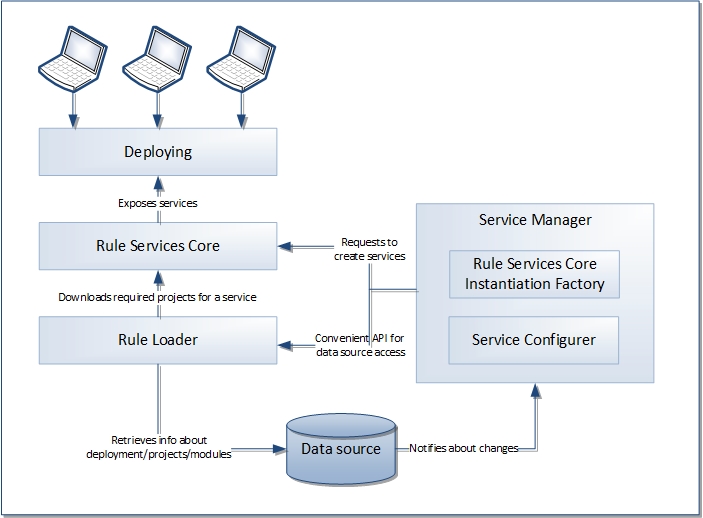
Overall OpenL Rule Services architecture
OpenL Rule Services provides the following key features and benefits:
- easily integrating customer business rules into various applications running on different platforms
- using different data sources, such as a central OpenL Tablets production repository or file system of a proper structure
- exposing multiple projects and modules as a single web service according to a project logical structure
The subsequent chapters describe how to set up a data source, Service Configurer, and a service exposing method, and how to integrate OpenL Tablets into the existing application.
OpenL Rule Services is based on Rule Services Core and supports all features provided by the Rule Services Core module.
The following diagram identifies all components to be configured and customized.

Configurable and customizable components of Rule Services Core
Rule Services Core
This section introduces Rule Services Core functionality and includes the following topics:
- Adding Dependencies into the Project
- Configuring Spring Integration for Rule Services Core
- Customizing and Configuring Rule Services Core
Adding Dependencies into the Project
To use the Rule Services Core within Maven, declare the module dependencies in the project object model (POM) as described in the following example:
<dependency>
    <groupId>org.openl.rules</groupId>
    <artifactId>org.openl.rules.ruleservice</artifactId>
    <version>${openl.version}</version>
</dependency>
If Apache Maven is not used in the project, it is recommended to download all dependencies via Maven and add all downloaded dependencies into the existing project classpath.
Configuring Spring Integration for Rule Services Core
This section describes how to configure Spring and Rule Services Core integration and includes the following topics:
- Adding a Bean Configuration File to the Spring Context Definition
- Simple Java Frontend Implementation
Adding a Bean Configuration File to the Spring Context Definition
To support the Rule Services Core features, add the openl-ruleservice-beans.xml bean configuration file into the application Spring context definition. An example is as follows:
<import resource="classpath:openl-ruleservice-beans.xml" />
After adding the Rule Services Core beans, Spring configuration has a simple Java frontend service as a default publisher for all OpenL Tablets services.
Simple Java Frontend Implementation
Spring configuration defined in the openl-ruleservice-beans.xml file registers the frontend bean with default frontend implementation. This bean implements the org.openl.rules.ruleservice.simple.RulesFrontendinterface that is designed to interact with deployed OpenL Tablets services.
| Inceptor | Description |
|---|---|
OpenLService findServiceByName(String serviceName) |
Find registered OpenL Tablets service by name. |
Object execute(String serviceName, String ruleName, Class<?>[] inputParamsTypes, Object[] params) |
Invokes a rule with the defined parameter types and parameter values from the deployed OpenL Tablets service. |
Object execute(String serviceName, String ruleName, Object... params) |
Invokes a rule with the defined parameter values from the deployed OpenL service. Parameter types are automatically defined from sent parameters. |
Object getValue(String serviceName, String fieldName) |
Returns field value from the defined OpenL Tablets service. |
Collection<String> getServiceNames() |
Returns a list of registered OpenL Tablets services. |
void registerService(OpenLService service) |
Registers the OpenL Tablets service. |
void unregisterService(String serviceName) |
Unregisters the OpenL Tablets service. |
<T> T buildServiceProxy(String serviceName, Class<T> proxyInterface) |
Builds a proxy for the OpenL Tablets service with a defined interface. |
<T> T buildServiceProxy(String serviceName, Class<T> proxyInterface, ClassLoader classLoader) |
Builds a proxy for the OpenL Tablets service with a defined interface and defined class loader. |
The frontendbean can be injected to user’s bean to interact with deployed OpenL Tablets services.
OpenLServiceFactoryBean is a factory bean implementation used to create a proxy object to interact with OpenL Tablets service. To create a proxy object, define a been factory as described in the following example:
<bean id="service1" class="org.openl.rules.ruleservice.simple.OpenLServiceFactoryBean">
    <!-- <property name="rulesFrontend" ref="frontend"/> optional. For custom implementation of RulesFrontend  -->
    <property name="serviceName" value="service1"/>
    <property name="proxyInterface" value="com.myproject.Service1"/>
</bean>
In this example, serviceName is a name of the deployed OpenL Tablets service and proxyInterface is an interface for building a proxy object. All invocations of proxy object methods are delegated to the executemethod of the frontendbean. The invoked method name with its parameters is used as input parameters for the executemethod.
Note: Proxy beans and proxy objects created by frontend bean are automatically updated if the OpenL Tablets service is redeployed into a data source. Nevertheless, these objects are not working while the project is redeployed. To synchronize this process, use Service Publisher listeners described in further sections.
Customizing and Configuring Rule Services Core
The Rule Services Core module configuration features resemble configuration features for OpenL Rule Services. The OpenL Rule Services customization and configuration information is provided in this document and can be applied to Rule Services Core in the same way. For the list of components supported only by OpenL Rule Services, see diagrams in Introduction.
OpenL Rule Services Configuration
OpenL Rule Services architecture allows extending mechanisms of services loading and deployment according to the particular project requirements.
This section describes OpenL Rule Services configuration and includes the following topics:
- OpenL Rule Services Default Configuration
- OpenL Rule Services Default Configuration Files
- Service Manager
- Configuration Points
OpenL Rule Services Default Configuration
All OpenL Rule Services configuration is specified in Spring configuration files and application*.*properties files. The application.properties file is located inside the application .warfile (inside WEB-INF/classes folder), in a user’s directory or in a working directory.
The configuration file located inside the .warfile contains default settings for all properties. Use it as a reference of possible settings and redefine as required in your configuration file, such as the application.properties file located in a user’s home directory.
All settings used in application.properties file can be defined as JVM options. In this case, JVM options override settings defined in files.
By default, OpenL Rule Services is configured as follows:
- A data source is configured as
FileSystemDataSourcelocated in the"${user.home}/.openl/datasource"folder. - All services are exposed as REST services using the CXF framework.
LastVersionProjectsServiceConfigureris used as a default service configurer that takes the last version of each deployment and creates the service for each project using all modules contained in the project.
OpenL Rule Services Default Configuration Files
If necessary, modify the OpenL Rule Services configuration by overriding the existing configuration files. All overridden Spring beans must be defined in the openl-ruleservice-override-beans.xmlfile. The following table lists Spring configuration files used in OpenL Rule Services:
| File | Description |
|---|---|
openl-ruleservice-beans.xml |
Main configuration file that includes all other configuration files. This file is searched by OpenL Rule Services in the classpath root. |
openl-ruleservice-core-beans.xml |
Configuration for ServiceManager and InstantiationFactory. |
openl-ruleservice-datasource-beans.xml |
Configuration for data sources. |
openl-ruleservice-loader-beans.xml |
Configuration for rules loader. |
openl-ruleservice-publisher-beans.xml |
Common publisher configurations. |
openl-ruleservice-jaxrs-publisher-beans.xml |
Configuration for RESTful services publisher. |
openl-ruleservice-rmi-publisher-beans.xml |
Configuration for RMI services publisher. |
openl-ruleservice-kafka-publisher-beans.xml |
Configuration for Kafka services publisher. |
openl-ruleservice-conf-beans.xml |
Configuration for Service Configurer. |
openl-ruleservice-store-log-data-beans.xml |
Configuration for external request and response storages. |
application.properties |
Main configuration file containing properties for OpenL Rule Services configuration. |
For more information on configuration files, see Configuration Points.
Service Manager
Service Manager is the main component of OpenL Rule Services frontend joining all major parts, such as a loader, rule service publishers, and Service Configurer. For more information on OpenL Rule Services frontend components, see OpenL Tablets Developers Guide.
Service Manager manages all currently running services and intelligently controls all operations for deploying, undeploying, and redeploying the services. These operations are only performed in the following cases:
- initial deployment at application startup
- processing after data source update
Service Manager always acts as a data source listener as described in further sections of this chapter.
Configuration Points
Any part of OpenL Rule Services frontend can be replaced by the user’s own implementation. For more information on the system architecture, see OpenL Tablets Developers Guide.
If the common approach is used, the following components must be configured:
| Component | Description |
|---|---|
| Data source | Informs the OpenL Tablets system where to retrieve user’s rules. |
| Service exposing method | Defines the way services are exposed, for example, as a web service or a simple Java framework. |
The following sections describe how to configure these components:
- Configuring a Data Source
- Service Configurer
- Service Exposing Methods
- Configuring System Settings
- CORS Filter Support
-
Logging Requests to OpenL Rule Services and Their Responds in a Storage
Note: There is a specific rule of parsing parameter names in methods. The algorithm checks the case of the second letter in a word and sets the first letter case the same as for the second letter. For example, parameters for
MyMethod (String fParam, String Sparam)in REST requests are defined asFParamandsparam.
Configuring a Data Source
The system supports the following data source implementations:
File System
Using a file system as a data source for projects means that projects are stored in a local folder. By default, the configuration folder represents a single deployment containing all the projects and does not support multiple deployments and project versions. This data source is used by default.
To configure a local file system as a data source, proceed as follows:
- In
application.properties, setproduction-repository.factory = repo-file.
By default, the${user.home}/.openl/openl-ruleservice/datasourcefolder is used as a local folder for projects. -
To enable versioning support for deployment, set the
ruleservice.datasource.filesystem.supportVersionsetting totrue.Note: For proper parsing of Java properties file, the path to the folder must be defined with a slash (‘/’) as the folders delimiter. Back slash “\” is not allowed.
Relational Database
To use a relational database repository as a data source, proceed as follows:
- Add the appropriate driver library for a database.
For example, for MySQL 5.6, it is the
mysql-connector-java-5.1.31.jar. - In the
application.propertiesfile, set repository settings as follows: - Set
production-repository.factory = repo-jdbc. -
Set the value for
production-repository.uriaccording to the database as follows:Database URL value MySQL, MariaDB jdbc:mysql://[host][:port]/[schema] Oracle jdbc:oracle:thin:@//[HOST][:PORT]/SERVICE MS SQL jdbc:sqlserver://[serverName[\instanceName][:portNumber]][;property=value[;property=value]] PostrgeSQL jdbc:postrgesql://[host][:port]/[schema] For example, for MySQL:
production-repository.uri = jdbc:mysql://localhost:3306/deployment-repository -
Set login and password for a connection to the database in production-repository.login and production-repository.password settings.
Note: The password must be encoded via Base64 encoding schema if the repository.encode.decode.key property is not empty.
production-repository.factory = repo-jdbc
production-repository.uri = jdbc:h2:mem:repo;DB_CLOSE_DELAY=-1
production-repository.login = root
production-repository.password = admin
# Secret key for password code/decode
secret.key=
#secret.cipher=AES/CBC/PKCS5Padding
Amazon AWS S3
To use an AWS S3 repository as a data source, proceed as follows:
-
To build a customized version of OpenL Rule Services with dependencies on
*org.openl.rules.repository.aws, create apom.xmlfile with the following content:<?xml version="1.0" encoding="UTF-8"?> <project xmlns="http://maven.apache.org/POM/4.0.0" xmlns:xsi="http://www.w3.org/2001/XMLSchema-instance" xsi:schemaLocation="http://maven.apache.org/POM/4.0.0 http://maven.apache.org/maven-v4_0_0.xsd"> <modelVersion>4.0.0</modelVersion> <groupId>com.example.openl</groupId> <artifactId>webservice-aws</artifactId> <packaging>war</packaging> <version>1.0-beta</version> <properties> <project.build.sourceEncoding>UTF-8</project.build.sourceEncoding> <org.openl.version>#Define OpenL Tablets version here#</org.openl.version> </properties> <dependencies> <dependency> <groupId>org.openl.rules</groupId> <artifactId>org.openl.rules.repository.aws</artifactId> <version>${org.openl.version}</version> </dependency> <dependency> <groupId>org.openl.rules</groupId> <artifactId>org.openl.rules.ruleservice.ws</artifactId> <type>war</type> <version>${org.openl.version}</version> </dependency> </dependencies> <dependencyManagement> <dependencies> <dependency> <groupId>com.fasterxml.jackson.core</groupId> <artifactId>jackson-databind</artifactId> <version>2.9.5</version> </dependency> <dependency> <groupId>com.fasterxml.jackson.core</groupId> <artifactId>jackson-annotations</artifactId> <version>2.9.5</version> </dependency> <dependency> <groupId>commons-codec</groupId> <artifactId>commons-codec</artifactId> <version>1.11</version> </dependency> </dependencies> </dependencyManagement> </project> -
Set the following properties in the
application.propertiesfile:properties production-repository.factory = repo-aws-s3 production-repository.bucket-name = yourBucketName production-repository.region-name = yourS3Region production-repository.access-key = yourAccessKey production-repository.secret-key = yourSecretKey
GIT
To use a Git repository as a data source, proceed as follows:
-
To build a customized version of OpenL Rule Services with dependencies on
*org.openl.rules.repository.git, create apom.xmlfile with the following content:<?xml version="1.0" encoding="UTF-8"?> <project xmlns="http://maven.apache.org/POM/4.0.0" xmlns:xsi="http://www.w3.org/2001/XMLSchema-instance" xsi:schemaLocation="http://maven.apache.org/POM/4.0.0 http://maven.apache.org/maven-v4_0_0.xsd"> <modelVersion>4.0.0</modelVersion> <groupId>com.example.openl</groupId> <artifactId>webservice-git</artifactId> <packaging>war</packaging> <version>1.0-beta</version> <properties> <project.build.sourceEncoding>UTF-8</project.build.sourceEncoding> <org.openl.version>>#Define OpenL Tablets version here#</org.openl.version> </properties> <dependencies> <dependency> <groupId>org.openl.rules</groupId> <artifactId>org.openl.rules.repository.git</artifactId> <version>${org.openl.version}</version> </dependency> <dependency> <groupId>org.openl.rules</groupId> <artifactId>org.openl.rules.ruleservice.ws</artifactId> <type>war</type> <version>${org.openl.version}</version> </dependency> </dependencies> </project> -
Build it with Maven:
mvn clean package. - Replace
webservice.warwith the war file you built. -
Set the following properties to the
application.propertiesfile (change necessary fields):production-repository.factory = repo-git production-repository.uri = https://github.com/<your-name>/your-repo.git production-repository.login = your-login production-repository.password = your-password -
Additionally, to override default values, add these optional properties:
properties
# The branch where deployed projects can be found.
production-repository.branch = master
# Committer's display name. If null, username will be “OpenL_Deployer”.
production-repository.user-display-name =
# Committer's email. If null, email will be empty.
production-repository.user-email =
# Repository connection timeout in seconds. Must be greater than zero.
production-repository.connection-timeout = 60
# Repository changes check interval in seconds. Must be greater than 0.
production-repository.listener-timer-period = 10
Classpath JAR
If rule projects with the rules.xml project descriptor are packed into a JAR file and placed in the classpath, these projects are deployed in the configured data source at the application launch.
Proceed as follows:
- Put the JAR file with the project to
\<TOMCAT_HOME>\webapps\<rule services file name>\WEB-INF\lib. - In the
application.propertiesfile, set up theruleservice.datasource.deploy.classpath.jars = true.
By default, this property is set to true.
Note: Project deployment is skipped if the data source already contains the project with the same name.
Service Configurer
This section introduces Service Configurer and includes the following topics:
- Understanding Service Configurer
- Deployment Configuration File
- Service Description
- Configuring the Deployment Filter
Understanding Service Configurer
Service Configurer resolves a list of services to be exposed, such as modules contained in each service, service interface, and runtime context provision.
Modules for a service can be retrieved for different projects. Each deployment containing in a data source has a set of properties and can be represented in several versions. Deployment consists of projects that also have properties and contain some modules. There can be only one version of a specific project in the deployment.
Each module for a service can be identified by the deployment name, deployment version, project name inside the deployment, and module name inside the project.
Different module gathering strategies according to their needs can be implemented by extending org.openl.rules.ruleservice.conf.ServiceConfigurer interface. Users can choose deployments and projects with concrete values of a specific property, such as service for some LOB property or service containing modules with an expiration date before a specific date, or versions of deployments, or both these approaches.
OpenL Tablets users typically need web services containing several rule projects or modules. In this case, multiple modules can be united in one service using the org.openl.rules.ruleservice.core.ServiceDescription service description. Service description contains information about the required service, such as the service name, URL, and service class, and can be expanded to contain new configurations. To instantiate several modules, users can rely on the OpenL Tablets multi-module mechanism that combines a group of modules into a single rules engine instance.
The org.openl.rules.ruleservice.conf.LastVersionProjectsServiceConfigurer default implementation of Service Configurer retrieves all deployments from a data source and publishes the latest versions of projects with unique version from the corresponding deployment configuration file rules-deploy.xml.In other words, if the version tag is not used in service description files for the same project versions, only one latest deployment version is published; otherwise, all deployment versions with unique version tag are published.
Deployment Configuration File
Default implementation of Service Configurer uses the rules-deploy.xml deployment configuration file from the project root folder. This file is created manually or via OpenL Studio. An example of the rules-deploy.xml file is as follows:
<rules-deploy>
    <isProvideRuntimeContext>true</isProvideRuntimeContext>
    <serviceName>myService</serviceName>
    <serviceClass>com.example.MyService </serviceClass>
    <url>com.example.MyService</url>
    <publishers>
        <publisher>RESTFUL</publisher>
    </publishers>
    <configuration>
        <entry>
            <string>someString</string>
            <string>someString</string>
        </entry>
    </configuration>
</rules-deploy>
When deploying a project to OpenL Rule Services, if the rules-deploy.xml file is missing or publishers are not defined, only the RESTful service is deployed according to the following property:
ruleservice.publishers=RESTFUL
| Tag | Description | Required |
|---|---|---|
| isProvideRuntimeContext | Identifies, if set to true, that a project provides a runtime context. The default value is defined in the application.properties file. |
No |
| serviceName | Defines a service name. The service name defined in the file is displayed for a deployed project in the embedded mode only. Otherwise, the service name is derived from its path. A default pattern is "{deployment_configuration_name}/{project_name}". |
No |
| serviceClass | Defines a service class. If it is not defined, a generated class is used. | No |
| rmiServiceClass | Define a service class to be used by RMI publisher. | Yes if RMI is used |
| version | Defines a service version. | No |
| url | Defines URL for a service. | No |
| annotationTemplateClassName | Defines an interface being used as a template to annotate dynamic generated interface class. | No |
| groups | Defines a list of comma-separated groups used for this project. | No |
| publishers | Defines a list of publishers for a project. Available values are as follows: - RESTFUL - RMI - KAFKA If the publisher list is empty, the service is deployed as a Java object without network API defined. This can be useful if deploying multiple projects in one deployment where some of these projects must not define the network API. |
No |
| configuration | Is used as extension point for custom service configuration. | No |
| jackson.serializationInclusion | Serialization option for JSON based services. | No |
| jackson.defaultDateFormat | Used to define date format is used in JSON. | No |
| jackson.caseInsensitiveProperties | Deserialization option for JSON based services. | No |
| jackson.failOnUnknownProperties | Deserialization option for JSON based services. For more information on this property, see Configuring JSON Payload Serialization and Deserialization. |
No |
| jackson.propertyNamingStrategy | Used to configure names of output spreadsheet attributes. Supported attribute name strategies are as follows: org.openl.rules.serialization.spr.LowerCamelCaseStrategy All name elements, excluding the first one, start with a capitalized letter, followed by lowercase ones. The first letter is lowercased, and there are no separators. Example: columnName. org.openl.rules.serialization.spr.SnakeCaseStrategy All letters are lowercase with underscores used as separators between name elements. Example: columnname_rowname. org.openl.rules.serialization.spr.LowerCaseStrategy All letters are lowercase with no separators. Example: columnname. org.openl.rules.serialization.spr.UpperCamelCaseStrategy All name elements start with a capitalized letter, followed by lowercase ones, and there are no separators. Example: ColumnNameRowName. |
|
| rootClassNamesBinding | Defines a list of classes for automatically define inheritance between defined classes and properly registering them. | No |
Service Description
Commonly each service is represented by rules and service interface and consists of the following elements:
| Service | Description |
|---|---|
| Service name | Unique service identifier. If a service name is defined in the rules-deploy.xmlfile, it is displayed for the service in the embedded mode only. Otherwise, the service name is generated from the path as "{deployment_configuration_name}/{project_name}". |
| Service URL | URL path for the service. It is absolute for the console start and relative to the context root for the ws.war case. |
| Service class | Interface of the service to be used at the server and the client side. |
| Version | Number of the service version. |
| Rules | Module or a set of modules to be combined as a single rules module. |
| Provide runtime context flag | Identifier of whether the runtime context must be added to all rule methods. If it is set to true, the IRulesRuntimeContext argument must be added to each method in the service class. |
Configuring the Deployment Filter
The system provides the ability to set up the Deployment Filter to filter deployments from configured data source when several applications use the same data source. Filtering selects deployments by name.
The property ruleservice.datasource.deployments is defined in the application.properties file and it is disabled by default.
To enable the Deployment Filter, set the exact deployment names using a comma separator, or use the wildcard character to enable the filter to match patterns in the deployment name:
ruleservice.datasource.deployments = foo-deployment, bar-*
The wildcard character “*” matches any characters in the deployment name as follows:
- If a single asterisk is used, any of the
foo-*,*deployment.singlewildcard character patterns detectfoo-deployment. - If multiple asterisks are used, any of the
*deploy*, *deployment*single wildcard character patterns detectfoo-deployment.
Service Exposing Methods
Common flow of service exposing is as follows:
- Retrieve service descriptions from a data source.
- Undeploy the currently running services that are not in services defined by Service Configurer.
Some services can become unnecessary in the new version of the product.
- Redeploy currently running services that are still in services defined by Service Configurer, such as service update.
- Deploy new services not represented earlier.
To set the method of exposing services, configure a Spring bean with the ruleServiceManager name in openl-ruleservice-publisher-beans.xml.
This bean supports mapping a concrete publisher for a service configuration or uses a default publisher if the publisher is not defined in the rules-deploy.xmldeployment configuration file.
To add a publisher, use any framework by implementations of org.openl.rules.ruleservice.publish.RuleServicePublisherinterface and register it in the ruleServicePublisher bean.
OpenL Rule Services supports following publisher implementations out of the box:
CXF REST Publisher
CXF REST Service Publisher implementation class is org.openl.rules.ruleservice.publish.JAXRSRuleServicePublisher. The Spring configuration for this publisher is located in the openl-ruleservice-jaxrs-publisher-beans.xmlfile.
The following URL can be used to retrieve a list of methods for a service:
webserver_context_path/ws_app_war_name/admin/services/{serviceName}/methods/
Defining a Date Format for JSON Serialization and Deserialization
REST services support the ISO-8601 standard for date type representation and accept the yyyy-MM-dd'T'HH:mm:ss.SSS format. Time and time zones are optional in requests. Time zones in ISO-8601 are represented as local time, with the location unspecified, as UTC, or as an offset from UTC. For more information on the ISO-8601 standard, see https://en.wikipedia.org/wiki/ISO_8601.
Date format can be defined in the ruleservice.jackson.defaultDateFormatproperty, in the application.properties file. The default date format value is as follows:
ruleservice.jackson.defaultDateFormat=yyyy-MM-dd'T'HH:mm:ss.SSS
This value is used by the system for all published projects that do not have the date format defined in the deployment configuration rules-deploy.xml file.
The jackson.defaultDateFormat value must be in the same syntax of the date time pattern as SimpleDateFormat described in https://docs.oracle.com/en/java/javase/11/docs/api/java.base/java/text/SimpleDateFormat.html.
Note that changing this setting affects all projects in the system. To change the date format for a particular project, modify the date format in the rules-deploy.xml deployment configuration file as follows:
<rules-deploy>
   ….
    <configuration>
        <entry>
            <string>jackson.defaultDateFormat</string>
            <string>yyyyMMddHHmmss</string>
        </entry>
    </configuration>
</rules-deploy>
Configuring JSON Payload Serialization and Deserialization
Default JSON properties serialization and deserialization behavior can be changed via ruleservice.jackson.serializationInclusion, ruleservice.jackson.caseInsensitiveProperties, and ruleservice.jackson.failOnUnknownProperties in the application.properties file. The default value for this property is set as follows:
ruleservice.jackson.serializationInclusion = USE_DEFAULTS
ruleservice.jackson.caseInsensitiveProperties = false
ruleservice.jackson.failOnUnknownProperties = false
These values are used by the system for all published projects that do not have these properties defined in the rules-deploy.xml file.
ruleservice.jackson.serializationInclusion is used for JSON serialization. Supported values are as follows:
| Value | Description |
|---|---|
| ALWAYS | A property is always included, regardless of the property value. |
| NON_ABSENT | Properties with no null values including no content null values are used. |
| NON_DEFAULT | All values except for the following are included: values considered empty primitive or wrapper default values date and time values that have a timestamp of `0L`, that is, `long` value of milliseconds since epoch |
| NON_EMPTY | Properties with empty values are excluded. |
| NON_NULL | Properties with non-null values are included. |
| USE_DEFAULTS | Defaults settings or annotations either from the class level or ObjectMapper level are used. |
For more information on serialization values, see https://fasterxml.github.io/jackson-annotations/javadoc/2.6/com/fasterxml/jackson/annotation/JsonInclude.Include.html.
JSON payload of the same datatype with different serializationInclusion property values are as follows:

JSON payload of the same datatype with different serializationInclusion values
ruleservice.jackson.caseInsensitivePropertiesis a JSON deserialization. The system matches JSON property names to a Java class ignoring case sensitivity if this property is enabled.
ruleservice.jackson.failOnUnknownPropertiesis a JSON deserialization. The system fails if a missing field in a datatype is present in the JSON request. By default, the system ignores JSON properties in a request that cannot be matched to existing Java classes.
ruleservice.jackson.failOnEmptyBeans is used in JSON serialization. The system fails when a fieldless datatype is present in the response. If this property is enabled, which is a default value, an exception is thrown to indicate non-serializable datatypes. If the property is disabled, non-serializable objects are serialized as empty objects, that is, without any properties.
Note: Changing these settings affects all projects in the system. To modify serializationInclusion for a particular project, modify the rules-deploy.xml deployment configuration file as follows:
<rules-deploy>
    …
    <configuration>
        <entry>
            <string>jackson.serializationInclusion</string>
            <string>NON_ABSENT</string>
        </entry>
        <entry>
            <string>jackson.failOnUnknownProperties</string>
            <string>true</string>
        </entry>
        <entry>
            <string>jackson.caseInsensitiveProperties </string>
            <string>NON_ABSENT</string>
        </entry>
        <entry>
            <string>jackson.failOnEmptyBeans</string>
            <string>false</string>
        </entry>
    </configuration>
</rules-deploy>
OpenL Rule Services uses a Jackson library to serialize an object to JSON and deserialize JSON to an object. This library supports configuration via MixIn annotation. For more information on MixIn annotations, see Jackson documentation https://github.com/FasterXML/jackson-docs/wiki/JacksonMixInAnnotations.
To register MixIn classes for a project, annotate the MixIn class with the org.openl.rules.ruleservice.databinding.annotation.MixInClassFor or org.openl.rules.ruleservice.databinding.annotation.MixInClassFor annotation and add this class to the rules-deploy.xml deployment configuration file as described further in this section. These annotations expect the class name that is used for registering MixIn class in the object mapper.
JAXB annotations is supported in the MixIn classes out of the box because the system is configured to use com.fasterxml.jackson.module.jaxb.JaxbAnnotationIntrospector as a secondary annotation interceptor in the object mapper for the deployed service.
Example of the Jackson MixIn class implementation is as follows:
@MixInClass(“org.openl.generated.beans.Customer”)
public abstract class CustomerMixIn {

    @JsonProperty(required = true)
    protected Integer customerID;

    @JsonIgnore
    protected Integer privateField;

    @JsonFormat(pattern = “yyyy-MM-dd”)
    protected Date dob;

    @JsonProperty(“genderCd”)
    @ApiModelProperty(example = “male”)
    protected String gender;
}
Example of the deployment configuration file is as follows:
<rules-deploy>
    …
    <configuration>
        <entry>
            <string>rootClassNamesBinding</string>
            <string>org.example.custom.mixin.CustomerMixIn</string>
        </entry>
    </configuration>
</rules-deploy>
RMI Publisher
RMI Service Publisher implementation class is org.openl.rules.ruleservice.publish.RmiRuleServicePublisher. The Spring configuration for this publisher is located in the openl-ruleservice-rmi-publisher-beans.xmlfile.
Note: The full RMI service address is rmi://hostname:port/rmi name specified by you in rules.xml file.
The appropriate port and host name for RMI can be defined in the application.properties file.
By default, these properties are defined as follows:
ruleservice.rmiPort = 1099 // Port for RMI
ruleservice.rmiHost = 127.0.0.1 // Used as host for RMI
Kafka Publisher
The system handles messages from the Kafka input topic and publishes rules calculation results to an output topic or dead letter topic if any error occurs during message processing.
Only Kafka brokers 0.11.0 and later are supported.
The following topics are included in this section:
- Modes for Exposing Services
- Supported Message Headers
- Custom Message Serialization
- Date Format Definition and JSON Serialization and Deserialization Configuration
- Spring Kafka Integration Support
Modes for Exposing Services
Kafka Publisher allows exposing the services in the following modes:
| Mode | Description |
|---|---|
| A user configures Kafka settings for each rules method to expose as a service. |
- All messages in all input topics belong to one rule method and have the same format. - One Kafka Consumer and two Kafka producers, that is, output topic and dead letter topic, are created for each exposed method. - Input topic, output topic, and DLT must be created for each method. |
| A user configures Kafka settings for a service. |
- All methods from this service are exposed as services. - Messages in the input topic belong to different rule methods and are of different format, depending on the method input parameters. - The method name is set via Kafka Headers. - One Kafka consumer and two producers, that is, output topic and dead letter topic, are created for a service. - One input topic, one output topic, and one DLT is enough for the OpenL Tablets service. - A service can be exposed in both modes at the same time. |
The following topics are included in this section:
- Enabling Kafka Publisher for a Service
- Configuring Application Level Kafka Settings
- Configuring Service Level Kafka Settings
Enabling Kafka Publisher for a Service
By default, Kafka Publisher is not used for deployed projects. To enable it, add the Kafka Publisher type to rules-deploy.xml as follows:
<rules-deploy>
    …
    <publishers>
        <publisher>KAFKA</publisher>
    </publishers>
    …
</rules-deploy>
Configuring Application Level Kafka Settings
OpenL Rule Services can be configured via the application.properties file or environment variables. Kafka-related settings are as follows:
| Property name | Default value | Description |
|---|---|---|
| ruleservice.kafka.bootstrap.servers | localhost:9092 | Comma separated Kafka broker hosts. |
ruleservice.kafka.group.id |
openl-webservice | Group name for all Kafka consumers created by the application. |
Configuring Service Level Kafka Settings
If an OpenL Tablets service is configured to use Kafka Publisher, the OpenL Tablets service must contain the kafka-deploy.yaml file in the same place where rules-deploy.xml deployment configuration is located.
Kafka settings for a service:
service:
    in.topic.name: in-topic-for-service
    out.topic.name: out-topic-for-service
    dlt.topic.name: dlt-topic-for-service
    consumer.configs:
        auto.offset.reset: earliest
    producer.configs:
        acks: all
    dlt.producer.configs:
        acks: all
Kafka setting for each rules method that want to expose as a service:
methods:
  - method.name: method1
    in.topic.name: in-topic-for-method1
    out.topic.name: out-topic-for-method1
    dlt.topic.name: dlt-topic-for-method1
    dlt.producer.configs:
        acks: 1
  - method.name: method2
    in.topic.name: in-topic-for-method2
    out.topic.name: out-topic-for-method2
    dlt.topic.name: dlt-topic-for-method2
    consumer.configs:
        auto.offset.reset: latest
Configuring Kafka consumers or Kafka producer is supported via producer.configs, consumer.configs, and dlt.producer.configs. These settings can be used for a service or each method.
Configurations in methods section extend and override the configuration from the service section.
The default configuration for all methods or service is supported if producer.configs, consumer.configs and dlt.producer.configs are defined at the top level of kafka-deploy.yaml.
It is possible to reference on the environment or system properties from the YAML configuration. For example the following is used by default in OpenL RuleServices:
consumer.configs:
    bootstrap.servers: ${ruleservice.kafka.bootstrap.servers}
    group.id: ${ruleservice.kafka.group.id}
    client.id: ${random.uuid}
For a complete list of configuration properties, see https://kafka.apache.org/documentation/#consumerconfigs and https://kafka.apache.org/documentation/#producerconfigs.
Supported Message Headers
Configurations out.topic.name and dlt.topic.name are optional, and the system can handle an output topic name and DLT topic name from record headers. A list of supported headers is as follows:
| Header name | Description |
|---|---|
methodName |
Method name. If an OpenL Tablets service is configured to use one input topic for all rule methods, this header defines a rule method name to invoke. If a rule method name is not unique in rules, for example, when overloading is used for a method, methodParameters header must be used as well. |
methodParameters |
Comma separated list of rule method types. Wildcards are supported. |
kafka_correlationId |
Information to correlate requests and replies. |
kafka_replyPartition |
Partition number on which to send the reply. |
kafka_replyTopic |
Default reply topic. If this header is defined, the output topic from a header is used by Kafka Publisher for this message. |
kafka_replyDltPartition |
Partition number on which to send the reply DLT topic. |
kafka_replyDltTopic |
Default reply DLT topic. If this header is defined, the DLT topic from a header is used by Kafka Publisher for this message. |
kafka_dlt-exception-fqcn |
Exception class name for a record published sent to a dead-letter topic. |
kafka_dlt-exception_message |
Exception message for a record published to a dead-letter topic. |
kafka_dlt-original-offset |
Original offset for a record published to a dead-letter topic. |
kafka_dlt-original-topic |
Original topic for a record published to a dead-letter topic. |
kafka_dlt-original-partition |
Original partition for a record published to a dead-letter topic. |
kafka_dlt-original-message-key |
Original message key for a record published to a dead-letter topic. |
Custom Message Serialization
By default, Kafka Publisher uses the JSON format.
To use custom serializers and deserializers, do the following:
- Implement custom deserializer for input parameters via the implementation
org.openl.rules.ruleservice.kafka.ser.MessageDeserializerclass. - Register a custom implemented deserializer in the
value.serializerKafka configuration property for particular consumers.
Date Format Definition and JSON Serialization and Deserialization Configuration
JSON configuration is the same as described for the REST services:
- Defining a Date Format for JSON Serialization and Deserialization
-
Configuring JSON Payload Serialization and Deserialization
Note: The same JSON serialization and deserialization configuration is used for REST publisher and Kafka publisher.
Spring Kafka Integration Support
Kafka Publisher supports Spring Kafka headers to work with Spring Kafka Request Reply design pattern implementation out of the box.
Configuring System Settings
Rules behavior in OpenL Tablets can be extended using one of the following options:
- Dispatching Table Properties
- Table Dispatching Validation Mode
- Configuring a Number of Threads to Rules Compilation
- Enabling Logging to Console
- Configuring the Instantiation Strategy
These settings are defined in the application.properties configuration file.
Dispatching Table Properties
Previously selecting tables that correspond to the current runtime context was processed by Java code. Now rules dispatching is the responsibility of the generated Dispatcher decision table. Such table is generated for each group of methods overloaded by dimension properties. The Dispatcher table works like all decision tables, so the first rule matched by properties is executed even if there are several tables matched by properties. Previously, in Java code dispatching, AmbiguousMethodException would be thrown in such case.
To support both functionalities, the dispatching.mode system property is introduced. It has the following possible values:
| Value | Description |
|---|---|
| java | Dispatching is processed by Java code. The benefit of such approach is stricter dispatching: if several tables are matched by properties, AmbiguousMethodException is thrown. |
| dt | Deprecated. Dispatching is processed by the Dispatcher decision table. |
If the system property is not specified or if the dispatching.mode property has an incorrect value, the Java approach is used by default.
Table Dispatching Validation Mode
An explanation of table dispatching validation is as follows.
Consider a rule table for which some business dimension properties are set up. There is only one version of this rule table. The following table describes options of versioning functionality behavior for this case depending on the dispatching.validation property value located in webstudio\WEB-INF\conf:
| Value | Versioning behavior description |
|---|---|
| True | Versioning functionality works as for a rule that has only one version. OpenL Tablets reviews properties values of this rule table and executes the rule if the specified properties values match runtime context. Otherwise, the No matching methods for context error message is returned. |
| False | OpenL Tablets ignores properties of this rule table, and this rule is always executed and returns the result value despite of runtime context. |
For table testing, dispatching validation is enabled by setting the dispatching.validation property value to true. The property is located in the application.properties file. In this case, versioning functionality works as for a rule that has only one version, and OpenL Tablets reviews properties values of this rule table and executes the rule if the specified properties values match runtime context. In production, this property value must be set to false.
By default, the dispatching.validation value is set to false in OpenL Rule Services and to true in OpenL Studio.
Configuring a Number of Threads to Rules Compilation
The system supports parallel rules compilation. Rules compilation consumes a large amount of memory. If the system tries to compile too many rules at once, it fails with an out of memory exception.
Use the ruleservice.instantiation.strategy.maxthreadsforcompileproperty in the application.properties file to limit the number of threads to compile rules.
By default, only three threads are used to compile rules in parallel:
ruleservice.instantiation.strategy.maxthreadsforcompile = 3
For example, to permit only one thread to compile rules, set value to one as follows:
ruleservice.instantiation.strategy.maxthreadsforcompile = 1
Enabling Logging to Console
To enable logging all requests to OpenL Rule Services and their responds to standard output, set the ruleservice.logging.enabledproperty in the application.properties file to true. This feature is very valuable in development. By default, it is disabled.
CORS Filter Support
Cross-Origin Resource Sharing (CORS) is a specification which is a standard mechanism that enables cross-origin requests. The specification defines a set of Access-Control-* headers that allow the browser and server to communicate about which requests are allowed. The filter also protects against HTTP response splitting. If request is invalid or is not permitted, the request is rejected with HTTP status code 403 (Forbidden). For more information on CORS, see https://fetch.spec.whatwg.org/.
The CORS filter supports the following initialization parameters:
| Attribute | Description |
|---|---|
| cors.allowed.origins | A list of origins that are allowed to access the resource. A * can be specified to enable access to resource from any origin. Otherwise, an allowed list of comma-separated origins can be provided. Examples: https://www.w3.org, https://www.example.com. The empty string means that no origin is allowed to access the resource. |
| cors.allowed.methods | A comma separated list of HTTP methods that can be used to access the resource using cross-origin requests. These methods are also included as a part of the Access-Control-Allow-Methods header in pre-flight response. Example: GET,POST. |
| cors.allowed.headers | A comma separated list of request headers for making an actual request. These headers are also returned as a part of the Access-Control-Allow-Headers header in pre-flight response. Example: Origin,Accept. |
| cors.preflight.maxage | The number of seconds a browser is allowed to cache the result of the pre-flight request. This attribute is included as a part of the Access-Control-Max-Age header in the pre-flight response. A negative value prevents a CORS filter from adding this response header to the pre-flight response. |
The default CORS configuration is as follows:
cors.allowed.origins =
cors.allowed.methods = GET,OPTIONS,HEAD,PUT,POST
cors.allowed.headers = Content-Type,Accept,api_key,Authorization
cors.preflight.maxage = 7200
Logging Requests to OpenL Rule Services and Their Responds in a Storage
The system provides an ability to store all requests to OpenL Rule Services and their responds in a storage. The setting is defined in the application.properties file. The following topics describe logging setup:
- Understanding Logging to an External Storage
- Enabling Logging to an External Storage
- Storing Log Records in Apache Cassandra
- Storing Log Records in the Relational Database
- Storing Log Records in Hive
Understanding Logging to an External Storage
OpenL Rule Services supports storing requests and responses for the REST and Kafka publishers in the external storage. This feature is designed to support any external storage and use the Apache Casandra out of the box.
For each request to OpenL Rule Services, the system creates an object of the org.openl.rules.ruleservice.storelogdata.StoreLogData class, which is populated with data during request processing and then can be stored in the configured storage. It contains the following data:
| Field name | Description |
|---|---|
| requestMessage | Request data for logging, such as request body, URL, request header, and request content type. |
| responseMessage | Response data for logging, such as response body, response status, and response header. |
| incomingMessageTime | Time when request is received by the server. |
| outcomingMessageTime | Time when response message preparation is completed and the message is ready to be sent to the client. |
| service | OpenL Tablets service used for the call. Data includes service name, compiled OpenL Tablets rules, and other information. |
| inputName | Method used for the call. |
| parameters | Parameters of the call, which is an array of objects after binding request message to models. |
When the logging data is collected, the system invokes the storing service responsible for saving logging data. The storing service must implement the org.openl.rules.ruleservice.storelogdata.StoreLogDataService interface.
Enabling Logging to an External Storage
By default, logging requests to OpenL Rule Services and their responds is disabled:
ruleservice.store.logs.enabled = false
To enable logging, set ruleservice.store.logs.enabled = true.
Storing Log Records in Apache Cassandra
Apache Cassandra is a free and open-source, distributed, wide column storage database that can be used as external storage. To start using Apache Cassandra, proceed as follows:
-
Download the OpenL Rule Services full web application at https://openl-tablets.org/downloads or use the following Maven command:
mvn dependency:copy -Dartifact=org.openl.rules:org.openl.rules.ruleservice.ws.full:<openl version here>:war -DoutputDirectory=./ -
Enable the Cassandra Storing Log feature using the
ruleservice.store.logs.cassandra.enabled=truesetting in theapplication.propertiesfile. -
Set up Cassandra connection settings defined in the
application.propertiesfile as described in the following lines:datastax-java-driver.basic.load-balancing-policy.local-datacenter = datacenter1 datastax-java-driver.basic.contact-points.0 = 127.0.0.1:9042 datastax-java-driver.basic.session-keyspace = openl_ws_logging datastax-java-driver.advanced.protocol.version = V4 datastax-java-driver.advanced.auth-provider.username = datastax-java-driver.advanced.auth-provider.password =For more information on Cassandra, see https://docs.datastax.com/en/developer/java-driver/4.5/manual/core/configuration/. For more information on connection configuration options, see https://docs.datastax.com/en/developer/java-driver/4.5/manual/core/configuration/reference/.
-
Before running the application, create a keyspace in Cassandra as described in https://docs.datastax.com/en/cql/3.1/cql/cql_reference/create_keyspace_r.html.
-
To create a schema in the Cassandra database, start OpenL Rule Services for the first time with the
ruleservice.store.logs.cassandra.schema.create = trueproperty.By default, this option is enabled. When the schema is created, set this property to the
falsevalue.
As a result, the following table with the openl_log_data name is created in the Cassandra database:
| Column name | Type | Description |
|---|---|---|
| ID | TEXT | Unique ID for the request. It is a primary key for the record. |
| INCOMINGTIME | TIMESTAMP | Incoming request time. |
| METHOD_NAME | TEXT | Method of a service that was called. |
| OUTCOMINGTIME | TIMESTAMP | Outgoing response time. |
| PUBLISHER_TYPE | TEXT | Request source, such as web service or REST service. |
| REQUEST | TEXT | Request body. |
| RESPONSE | TEXT | Response body. |
| SERVICE_NAME | TEXT | Deployment service that was called. |
| URL | TEXT | URL of the request. |
Note: Only methods annotated with org.openl.rules.ruleservice.storelogdata.cassandra.annotation.StoreLogDataToCassandraare used for storing their requests and responses in Apache Cassandra. The system supports customization to use different tables for each OpenL Tablets project, use product specific table names, and configure a set of columns of tables. For more information on customization using annotations, see Service Customization through Annotations.
Storing Log Records in the Relational Database
To start using a relational database, proceed as follows:
-
Download the OpenL Rule Services full web application at https://openl-tablets.org/downloads or use the following Maven command:
mvn dependency:copy -Dartifact=org.openl.rules:org.openl.rules.ruleservice.ws.full:<openl version here>:war -DoutputDirectory=./ -
Enable the relational database Storing Log feature using the
ruleservice.store.logs.db.enabled=truesettingin theapplication.propertiesfile. -
Set up the Hibernate connection settings defined in the
application.propertiesfile as described in the following lines:hibernate.connection.driver_class=oracle.jdbc.driver.OracleDriver hibernate.connection.url= hibernate.connection.username= hibernate.connection.password= hibernate.show_sql=false hibernate.hbm2ddl.auto=update hibernate.connection.provider_class=org.hibernate.hikaricp.internal.HikariCPConnectionProvider hibernate.hikari.connectionTimeout=20000 hibernate.hikari.minimumIdle=10 hibernate.hikari.maximumPoolSize=20 hibernate.hikari.idleTimeout=300000
Relational database is supported via the Hibernate framework. Hibernate connection properties, such as hibernate.connection.driver_class and hibernate.connection.url, must be used to configure a connection to a relational database. For a full list of properties, see Hibernate documentation at https://docs.jboss.org/hibernate/orm/5.6/userguide/html_single/Hibernate_User_Guide.html#database.
If table creating is enabled in Hibernate, the system creates the following table with the openl_log_data name:
| Column name | Type | Description |
|---|---|---|
| ID | TEXT | Unique ID for the request. It is a primary key for the record. |
| INCOMINGTIME | TIMESTAMP | Incoming request time. |
| METHOD_NAME | TEXT | Method of a service that was called. |
| OUTCOMINGTIME | TIMESTAMP | Outgoing response time. |
| PUBLISHER_TYPE | TEXT | Request source, such as web service or REST service. |
| REQUEST | TEXT | Request body. |
| RESPONSE | TEXT | Response body. |
| SERVICE_NAME | TEXT | Deployment service that was called. |
| URL | TEXT | URL of the request. |
Note: Only methods annotated with org.openl.rules.ruleservice.storelogdata.db.annotation.StoreLogDataToDBare used for storing their requests and responses in a relational database. The system supports customization to use different tables for each OpenL Tablets project, use product specific table names, and configure a set of columns for tables. For more information on customization using annotations, see Service Customization through Annotations.
Storing Log Records in Hive
Apache Hive is supported as external storage out of the box. The Hive data warehouse software facilitates reading, writing, and managing large datasets residing in distributed storage using SQL. Structure can be projected onto data already in storage. A command line tool and JDBC driver are provided to connect users to Hive.
The system uses the JDBC driver to communicate with the Hive server that process application requests.
To start using Hive, proceed as follows:
-
Download the OpenL Rule Services full web application at https://openl-tablets.org/downloads or use the following Maven command:
mvn dependency:copy -Dartifact=org.openl.rules:org.openl.rules.ruleservice.ws.all:<openl version here>:war -DoutputDirectory=./ -
Set up Hive connection settings defined in the
application.propertiesfile as follows:ruleservice.store.logs.hive.enabled = true hive.connection.url = jdbc:hive2://localhost:10000/default hive.connection.username = hive.connection.password = hive.connection.pool.maxSize = 10
The following properties can be modified to configure Hive:
| Property | Description |
|---|---|
| ruleservice.store.logs.hive.enabled | Property to enable storing Hive logs. |
| hive.connection.url | URL for connecting to the Hive server. Example: hive.connection.url = jdbc:hive2://localhost:10000/default |
| hive.connection.username | Username for connecting to the Hive server. |
| hive.connection.password | Password for connecting to the Hive server. |
| hive.connection.pool.maxSize | OpenL Tablets uses HikariCP JDBC connection pool for managing Hive connections. The default pool size is 10. For more information on HikariCP, see https://github.com/brettwooldridge/HikariCP. |
| ruleservice.store.logs.hive.table.create | If set to true, property that enables the SQL script to create a table before making a record in it. |
As a result, the following table with the default openl_log_data name is created in Hive:
| Column name | Type | Description |
|---|---|---|
| ID | STRING | Unique ID for the request. It is a primary key for the record. |
| INCOMINGTIME | TIMESTAMP | Incoming request time. |
| METHODNAME | STRING | Method of a service that was called. |
| OUTCOMINGTIME | TIMESTAMP | Outgoing response time. |
| PUBLISHERTYPE | STRING | Request source, such as web service or REST service. |
| REQUEST | STRING | Request body stored as JSON. |
| RESPONSE | STRING | Response body stored as JSON. |
| SERVICENAME | STRING | Deployment service that was called. |
| URL | STRING | URL of the request. |
Note: Only methods annotated with org.openl.rules.ruleservice.storelogdata.hive.annotation.StoreLogDataToHive are used for storing their requests and responses to Hive. The system supports customization to use different tables for each OpenL Tablets project, use product specific table names, and configure a set of columns of the tables. For more information on customization using annotations, see Service Customization through Annotations.
OpenL Rule Services Advanced Configuration and Customization
This section describes OpenL Rule Services advanced services configuration and customization and explains the following:
- OpenL Rule Services Customization Algorithm
- Data Source Listeners
- Service Publishing Listeners
- Dynamic Interface Support
- Service Customization through Annotations
- Customization of Log Requests to OpenL Rule Services and Their Responds in a Storage
OpenL Rule Services Customization Algorithm
If a project has specific requirements, OpenL Rule Services customization algorithm is as follows:
- Create a Maven project that extends OpenL Rule Services.
- Add or change the required points of configuration.
-
Add the following dependency to the
pom.xmlfile with the version used in the project specified:<dependency> <groupId>org.openl.rules</groupId> <artifactId>org.openl.rules.ruleservice.ws</artifactId> <version>5.X.X</version> <type>war</type> <scope>runtime</scope> </dependency> -
Use the following Maven plugin to control the OpenL Rule Services building with user’s custom configurations and classes:
<plugin> <groupId>org.apache.maven.plugins</groupId> <artifactId>maven-war-plugin</artifactId> <configuration> <warSourceDirectory>webapps/ws</warSourceDirectory> <!—Define war name here--> <warName>${war.name}-${project.version}</warName> <packaging Excludes> <!—Exclude unnecessary libraries from parent project here--> WEB-INF/lib/org.openl.rules.ruleservice.ws.lib-*.jar </packaging Excludes> <!—Define paths for resources. Developer has to create a file with the same name to overload existing file in the parent project--> <web Resources> <resource> <directory>src/main/resources</directory> </resource> <resource> <directory>war-specific-conf</directory> </resource> </web Resources> </configuration> </plugin> -
If necessary, add customized spring beans into openl-ruleservice-override-beans.xml in src/main/resources.
Data Source Listeners
A data source registers data source listeners and notifies some components of OpenL Rule Services about modifications. The only available event type on the production repository modification is about newly added deployment.
A service manager is always a data source listener because it must handle all modifications in the data source.
Users can add their own listener implementing org.openl.rules.ruleservice.loader.DataSourceListener for additional control of data source modifications with the required behavior and register it in data source via Spring configuration.
Service Publishing Listeners
Service publishing listeners notify about the deployed or undeployed OpenL Tablets projects. Users can add their own listeners implementing org.openl.rules.ruleservice.publisher.RuleServicePublisherListener for additional control of deploying and undeploying projects with the required behavior and add them to the Spring configuration. The system automatically finds and registers all Spring beans implemented RuleServicePublisherListener interface as a publishing listener.
The org.openl.rules.ruleservice.publisher.RuleServicePublisherListener interface has the following methods:
| Inceptor | Description |
|---|---|
| onDeploy(OpenLService) | Invoked each time when the OpenL Tablets service is deployed with the publisher that fires this listener. |
| onUndeploy(String serviceName) | Invoked each time when the service with the defined name is undeployed. |
Dynamic Interface Support
OpenL Rule Services supports interface generation for services at runtime. This feature is called Dynamic Interface Support. If a static interface is not defined for a service, the system automatically generates an interface at runtime with all methods defined in the module or, in case of a multimodule, in the list of modules.
This feature is enabled by default. To use a dynamic interface, do not define a static interface for a service in rules-deploy.xmlservice description file.
It is not a good practice to use all methods from a module in a generated interface because of the following limitations:
- All return types and method arguments in all methods must be transferrable through network.
- An interface for web services must not contain the method designed for internal usage.
The system provides a mechanism for filtering methods in modules by including or excluding them from the dynamic interface.
This configuration can be applied to projects using the rules.xml file. An example is as follows:
<project>
    <name>project-name</name>
    <modules>
        <module>
            <name>module-name</name>
            <rules-root path="rules/Calculation.xlsx"/>
            <method-filter>
                <includes>
                    <value>.*determinePolicyPremium.*</value>
                    <value>.*vehiclePremiumCalculation.*</value>
                </includes>
           </method-filter>
       </module>
    </modules>
    <classpath>
        <entry path="lib/*"/>
    </classpath>
</project>
For filtering methods, define the method-filter tag in the rules.xml file. This tag contains the includes and excludes tags. The algorithm is as follows:
- If the
method-filter tag is not defined in therules.xml, the system generates a dynamic interface with all methods provided in the module or modules for multimodule. - If the
includestag is defined for method filtering, the system uses the methods which names match a regular expression of defined patterns. - If the
includestag is not defined, the system includes all methods. - If the
excludestag is defined for method filtering, the system uses methods which method names do not match a regular expression for defined patterns. - If the excludes tag is not defined, the system does not exclude the methods.
If OpenL Tablets Dynamic Interface feature is used, a client interface can also be generated dynamically at runtime. Apache CXF supports the dynamic client feature. For more information on dynamic interface support by Apache CXF, see http://cxf.apache.org/docs/dynamic-clients.html.
Note: If a project is empty and does not contain any method, it is unavailable as a service.
Service Customization through Annotations
This section describes interface customization using annotations. The following topics are included:
- Interceptors for Methods
- Method Return Type Customization through Annotations
- REST Endpoint Customization through Annotations
- Customization through Annotations for Dynamic Generated Interfaces
Interceptors for Methods
Required Maven dependency for OpenL Rule Services annotations is org.openl.rules:org.openl.rules.ruleservice.annotation. Use the provided scope for dependency because this dependency already exists in OpenL Rule Services and it must not be included in the deployment distributive to avoid class duplication in the Java ClassLoader.
Interceptors for service methods can be specified using the following annotations:
@org.openl.rules.ruleservice.core.interceptors.annotations.ServiceCallBeforeInterceptor
This annotation is used to define “before” interceptors for the annotated method. The goal of these interceptors is to add extra logic before service method invocation, such as validation for service method arguments, or to change values in input arguments. A class of the “before” interceptor must implement the org.openl.rules.ruleservice.core.interceptors.ServiceMethodBeforeAdvice interface.
An example is as follows:
public class RequestModelValidator implements ServiceMethodBeforeAdvice {
    public void before(Method interfaceMethod, Object proxy,
                       Object... args) throws Throwable {
        if (args == null || args.length == 0) {
            throw new IllegalArgumentException("Service method should have at least one argument");
        }
        //other validation logic
    }
}
To use the “before” interceptor, proceed as follows:
@ServiceMethodBeforeAdvice({ RequestModelValidator.class })
Result doSomething(RequestModel requestModel);
@org.openl.rules.ruleservice.core.interceptors.annotations.ServiceCallAroundInterceptor
This annotation is used to define “around” interceptors. A class for the “around” interceptor must implement the org.openl.rules.ruleservice.core.interceptors.ServiceMethodAroundAdvice interface. “Around” interceptors are used to add around logic for service method invocation. An example is when arguments of the case service method must be converted to another type before using them in service rules, and the results also require additional processing before return.
An example is as follows:
public class MyMethodAroundInterceptor implements ServiceMethodAroundAdvice<Response> {
    @Override
    public Response around(Method interfaceMethod, Method proxyMethod, Object proxy, Object... args) throws Throwable {
        Result res = (Result) proxyMethod.invoke(proxy, args);
        return new Response("SUCCESS", res);
    }
}
To use the “around” interceptor, proceed as follows:
@ServiceCallAroundInterceptor({ MyMethodAroundInterceptor.class })
Response doSomething(RequestModel requestModel);
@org.openl.rules.ruleservice.core.interceptors.annotations.ServiceCallAfterInterceptor
This annotation is used to defined “after” interceptors. This type of interceptions is used for result processing or error handling before return by the service method.
The following table describes “after” interceptor types:
| Inceptor | Description |
|---|---|
AfterReturning |
Intercepts the result of a successfully calculated method, with a possibility of post processing of the return result, including result conversion to another type. In this case, the type must be specified as the return type for the method in the service class. AfterReturning interceptors must be a subclass of org.openl.rules.ruleservice.core.interceptors.AbstractServiceMethodAfterReturningAdvice. |
AfterThrowing |
Intercepts a method that has an exception thrown, with a possibility of post processing of an error and throwing another type of exception. AfterThrowing interceptors must be a subclass of org.openl.rules.ruleservice.core.interceptors.AbstractServiceMethodAfterThrowingAdvice. |
Example of the “after” interceptor implementation with after returning logic is as follows:
public class SpreadsheetResultConverter extends
                               AbstractServiceMethodAfterReturningAdvice<ResponseDTO> {

    @Override
    public ResponseDTO afterReturning(Method interfaceMethod,
                                      Object result, Object... args) {
        SpreadsheetResult = (SpreadsheetResult) result;
        return mapSpreadsheetResultToResponseDTO(spreadsheetResult);
    }

    private ResponseDTO mapSpreadsheetResultToResponseDTO(SpreadsheetResult result) {
        ResponseDTO response = new ResponseDTO();
        response.setPremium((Double) result.getFieldValue("$Value$PremiumStep"));
        // Do some other mapping logic...
        return response;
    }
}
Example of the “after” interceptor implementation with after throwing logic is as follows:
public class ExceptionHandlingAdvice extends AbstractServiceMethodAfterThrowingAdvice <ResponseDTO> {
    private static final Logger LOG = LoggerFactory.getLogger(ExceptionHandlingAdvice.class);
    @Override
    public ResponseDTO afterThrowing(Method iMethod, Exception t, Object... args) {
        LOG.error(t.getMessage(), t);
        return new ResponseDTO("INTERNAL_ERROR", t.getMessage());
    }
}
To use the “after” interceptor, proceed as follows:
@ServiceCallAfterInterceptor({ SpreadsheetResultConverter.class, ExceptionHandlingAdvice.class })
ResponseDTO doSometing(Request request);
Use @org.openl.rules.ruleservice.core.interceptors.annotations.NotConvertor or @org.openl.rules.ruleservice.core.interceptors.annotations.UseOpenMethodReturnType on an interceptor implementation class when an interceptor must return a type of the generated class that is not available at compilation time to use as a generic parameter of the interceptor class. The NotConvertor annotation instructs the system that the interceptor does not change the return type of the method even if Object or any other class is used as a generic parameter of the class. The UseOpenMethodReturnType annotation instructs the system that the interceptor returns the original type of the rules method even if any other type is used as a generic parameter of the interceptor class.
@org.openl.rules.ruleservice.core.annotations.ServiceExtraMethod
This annotation is used to define the extra method absent in OpenL rules. Additional method implementation must implement org.openl.rules.ruleservice.core.annotations.ServiceExtraMethodHandler interface, and it exposes methods that differ in signature with the rules or do not exist in the Excel sheet.
For example, an Excel file contains the String hello(String) method and this method must be exposed as String hello(Integer).
The advice class uses the same class loader that is used to compile the OpenL Tablets project. It means that a user can access all datatype classes generated by the system for a particular project. An additional method can be used when additional mapping between the OpenL Tablets model and external model is required, for example:
    public static class LoadClassExtraMethod implements ServiceExtraMethodHandler<Object> {
        @Override
        public Object invoke(Method interfaceMethod, Object serviceBean, Object... args) throws Exception {
            // MyBean is Datatype defined in OpenL
            Class<?> myBeanClass = Thread.currentThread().getContextClassLoader()
                        .loadClass("org.openl.generated.beans.MyBean");
            Object myBean = myBeanClass.newInstance();
            // … Do some mapping below and then return result
            return myBean;
        }
    }
Note: Java byte code does not have argument names in interfaces, so they are named as 'arg0', 'arg1', and so on. To request more meaningful names for parameters, use the @ org.openl.rules.ruleservice.core.annotations.Name annotation together with @ServiceExtraMethod.
Use the org.openl.rules.ruleservice.core.interceptors.IOpenMemberAware and org.openl.rules.ruleservice.core.interceptors.IOpenClassAware interfaces if a reference to the compiled IOpenClass or IOpenMember object is required in an interceptor implementation class.
Method Return Type Customization through Annotations
By default, OpenL Tablets applies the org.openl.rules.ruleservice.core.interceptors.converters.SPRToPlainConverterAdvice interceptor to all spreadsheet table methods that return SpreadsheetResult. These annotations transform the spreadsheet table result to the generated Java bean and return it instead of SpreadsheetResult.
Note: If any interceptor is used on the method, the SPRToPlainConverterAdvice interceptor must be added manually to keep default behavior.
To change default behavior, define @org.openl.rules.ruleservice.core.interceptors.annotations.ServiceCallAfterInterceptorwith an empty value on the method to return SpreadsheetResult.
REST Endpoint Customization through Annotations
By default, URLs and HTTP method type for methods are determined automatically by the system. The path for the methods equals the corresponding service method name, and HTTP method type depends on used arguments: if the service method has at least one argument, a HTTP method type is set to POST, otherwise, to GET.
The following JAX-RS annotations can be used to override the default behavior of service method publishing:
| Annotation | Import details |
|---|---|
@POST |
import javax.ws.rs.POST; |
@GET |
import javax.ws.rs.GET; |
@Path |
import javax.ws.rs.Path; |
@POSTannotation overrides a default method type.
Service methods annotated @POST accepts only POST requests. Usage example is as follows:
@POST
MyResponse someMethod();
@GETannotation overrides a default method type.
Service method annotated @GET accepts only GET requests. Usage example is as follows:
@GET
MyResponse someMethod(MyType myType);
@Pathannotation overrides a default URL method path.
Usage example is as follows:
@Path(“/customPrefix/someMethod”)
MyResponse someMethod(MyType myType);
Required Maven dependency is as follows:
<dependency>
    <groupId>jakarta.ws.rs</groupId>
    <artifactId>jakarta.ws.rs-api</artifactId>
    <version>2.1.5</version>
    <scope>provided</scope>
</dependency>
Note: It is not necessary to declare pairs of @POST + @Path or @GET + @Path because OpenL Tablets provides the capability to define a single annotation and generate the other one automatically.
All other JAX-RS annotations, such as @PUT, @DELETE, @QueryParam, and @PathParam, are also supported by OpenL Tablets. For more information on JAX-RS annotation, see https://docs.oracle.com/javaee/7/api/javax/ws/rs/package-summary.html.
Customization through Annotations for Dynamic Generated Interfaces
Annotation customization can be used for dynamically generated interfaces. This feature is only supported for projects that contain the rules-deploy.xmldeployment configuration file. To enable customization through annotation, proceed as follows:
-
Add the
annotationTemplateClassNametag to therules-deploy.xmlfile.An example is as follows:
<rules-deploy> <isProvideRuntimeContext>true</isProvideRuntimeContext> <serviceName>dynamic-interface-test3</serviceName> <annotationTemplateClassName>org.openl.ruleservice.dynamicinterface.test.MyTemplateClass</annotationTemplateClassName> <url></url> </rules-deploy> -
Define a template interface with the annotated methods with the same signature as in a generated dynamic interface.
This approach supports replacing argument types in the method signature with types assignable from generated types in the generated interface.
Example: SubType is a subclass of class MyType. Consider the following methods are generated in the generated interface:
void someMethod(IRulesRuntimeContext context, MyType myType);
void someMethod(IRulesRuntimeContext context, SubType otherType);
Add an annotation to the first method using the same method signature in the template interface as follows:
@ServiceCallAfterInterceptor(value = { MyAfterAdvice.class })
void someMethod(IRulesRuntimeContext context, MyType myType);
If the MyType class is also generated at runtime, use a super type of the MyType class. An example is as follows:
@ServiceCallAfterInterceptor(value = { MyAfterAdvice.class })
void someMethod(IRulesRuntimeContext context, @RulesType("MyType") Object myType);
This example uses the @org.openl.rules.ruleservice.core.interceptors.RulesType annotation. If this annotation is missed, this template method is applied to both methods because Object is assignable from both types MyTypeand SubType.
The @RulesType annotation value accepts the following:
- canonical class name
- datatype name
- custom SpreadsheetResult name
Use this annotation if more details are required to define a template method.
Note: A user can also use class level annotations for a dynamically generated class. It can be useful for JAX-WS or JAX-RS interface customization.
Customization of Log Requests to OpenL Rule Services and Their Responds in a Storage
This section describes advanced customization for logging requests to OpenL Rule Services and their responds in a storage if different parts of the input and output data must be stored separately. It also describes how to customize a structure of tables and indexes in a storage.
The following topics are included:
- Storage Service for Log Requests and Their Responds
- Customization for Apache Cassandra
- Customization for the Relational Database
- Customization for Hive
Storage Service for Log Requests and Their Responds
This section describes storage service used for log requests and responds and includes the following topics:
- Log Request and Response Storage Service Overview
- Collecting Data from Requests and Their Responds and Populating Custom Values
- Log Requests and Their Responds Customization Using Annotations
Log Request and Response Storage Service Overview
OpenL Rule Services supports Apache Cassandra and relational database storages to log request and their responds out of the box. This part of the system is designed customizable and extendable via the org.openl.rules.ruleservice.storelogdata.StoreLogDataService interface to support the third-party storages.
The StoreLogDataService interface has the following methods:
| Method | Description |
|---|---|
| boolean isEnabled() | Identifies whether the log storing service is enabled. |
| void save(StoreLogData storeLogData) | Saves storeLogData data to a storage. |
The implementation class of this interface must be registered in the application Spring context. The system discovers all implementation of the interface automatically and uses all found services at the same time.
org.openl.rules.ruleservice.storelogdata.StoreLogData is a class that contains all available data from the request and respond. This class has the getCustomValues() method that returns a map for interested values that can be stored separately from request payload.
Custom implementation of the StoreLogDataService interface supports all features described in this document.
Annotation on the called method @org.openl.rules.ruleservice.storelogdata.annotation.SkipFaultStoreLogData instructs the system to skip storing fault requests and their responds in a storage.
Collecting Data from Requests and Their Responds and Populating Custom Values
Populating custom values in the StoreLogData object and collecting data for service methods is defined using the @org.openl.rules.ruleservice.storelogdata.annotation.PrepareStoreLogData annotation.
| Attribute | Description |
|---|---|
| value | Mandatory reference to the StoreLogDataAdvice interface implementation. The implementation class defines which data is collected. |
| bindToServiceMethodAdvice | Optional reference to an implementation of the ServiceMethodAdvice interface. It defines that the implementation of the theStoreLogDataAdvice interface must be invoked before or after the corresponding ServiceMethodAdvice implementation. It is used when required data for collecting is not more available after result transformation. |
| before | Optional attribute specifying the order of the called data collecting advice. If the bindToServiceMethodAdvice attribute is present, before determines the advice execution relative to the defined interceptor, otherwise relative to the base method. The default value is false, that is, execution happens after method or interceptor. |
Implement a single method in the StoreLogDataAdvice interface for collecting data to be used along with the @Value annotation in entities or directly from StoreLogData.getCustomValues().
Using more than one @PrepareStoreLogData to logically decouple the code of collecting a data is allowed for the same method.
All these annotations can be used on fields or on getter or setter methods in entity classes.
The org.openl.rules.ruleservice.storelogdata.advice.StoreLogDataAdvice interface has only one method to implement. An example is as follows:
public class CollectDataStoreLogDataAdvice implements StoreLogDataAdvice {
   @Override
   public void prepare(Map<String, Object> values, Object[] args, Object result, Exception ex) {
       values.put(“state", ((CalculationResult)result).getState());
   }
}
To programmatically control whether a call to the service must be stored or skipped, use the org.openl.rules.ruleservice.storelogdata.StoreLogDataHolder.get().ignore() line of code in implementation of StoreLogDataAdvice.
If compound object serialization to string is required in StoreLogDataAdvice, use the org.openl.rules.ruleservice.storelogdata.advice.ObjectSerializerAware interface. It injects the org.openl.rules.ruleservice.storelogdata.ObjectSerializer instance automatically via the void setObjectSerializer(ObjectSerializer objectSerializer) method. ObjectSerializer provides functionality to serialize an object to a string with the same mechanism used in the invoked publisher. For example, it produces a JSON string for REST or Kafka services.
Log Requests and Their Responds Customization Using Annotations
OpenL Rule Services has annotations for mapping requests and their responds data to entity classes. The org.openl.rules: org.openl.rules.ruleservice.ws.storelogdata Maven dependency is required for the log requests and their respond annotations. Use the provided scope for dependency as it already exists in OpenL Rule Services and it must not be included in the deployment distributive to avoid class duplication in ClassLoader.
The org.openl.rules.ruleservice.storelogdata.StoreLogDataMapper class maps OpenL Tablets annotations to the entity class.
The following annotations located in the org.openl.rules.ruleservice.storelogdata.annotation package are supported:
| Annotation | Field Type | Description |
|---|---|---|
IncomingTime |
ZonedDateTime |
Incoming request time. |
OutcomingTime |
ZonedDateTime |
Outgoing response time. |
MethodName |
String |
Method of a service that is called. |
ServiceName |
String |
Deployment service name that is called. |
Publisher |
String |
Request source, such as web service or REST service or Kafka. |
Request |
String |
Request body, such as JSON for the REST service, and message body for Kafka. |
Response |
String |
Response body, such as JSON for REST service, and message body for Kafka. |
Url |
String |
URL of the request if available. |
Value |
Object |
Value from the map that is returned by StoreLogData .getCustomValues() |
KafkaMessageHeader |
byte[] |
Kafka message header data. The value attribute with a defined header name is required. The type attribute is used to define a producer or consumer message to use. |
All annotations described in this section have an optional converter attribute for converting a collected type into the required field type. Use implementation of the org.openl.rules.ruleservice.storelogdata.Converter interface for the convertor attribute. A usage example of this interface is as follows:
public final class ZonedDataTimeToDateConvertor implements Converter<ZonedDateTime, Date> {
    @Override
    public Date apply(ZonedDateTime value) {
        return value != null ? Date.from(value.toInstant()) : null;
    }
}
Customization for Apache Cassandra
This section describes customization for Apache Cassandra and automatically creating a table schema for entity classes. The following topics are described:
- Log Requests and Responds Customization for Apache Cassandra
- Automatically Creating a Cassandra Table Schema Creation for Entity Classes
Log Requests and Responds Customization for Apache Cassandra
Service storing log requests and their responds for Apache Cassandra requires a Cassandra driver version 4.x. The Cassandra driver uses a new mapping model between object in the code and a table in a database. For more information on mapping, see https://docs.datastax.com/en/developer/java-driver/4.3/manual/mapper/. The nutshell working with this model assumes that there are three objects: Entity, Dao, and Mapper interface.
For a method, to enable logging requests and their responds to Apache Cassandra, annotate calling method with the @org.openl.rules.ruleservice.storelogdata.cassandra.annotation.StoreLogDataToCassandra annotation. The annotation has an optional attribute that obtains entity classes. If @StoreLogDataToCassandra is used with an empty value, the default table described in Storing Log Records in Apache Cassandra is used. If more than one entity class is used in the value attribute for the @StoreLogDataToCassandra annotation, the system splits data and stores it in multiple Cassandra tables.
An entity is a simple data container that represents a row in the product table. For more information on entities, see https://docs.datastax.com/en/developer/java-driver/4.3/manual/mapper/entities/.
Cassandra entity example is as follows:
@Entity
@EntitySupport(PersonOperations.class)
@CqlName("person")
public class Person {
   @PartitionKey()
   @Value("id")
   private String id;
   @PartitionKey(1)
   @Value(value = "birthday")
   private ZonedDateTime birthday;
   @Request
   private String request;
   @Response
   private String response;
…
}
A data access object (DAO) defines a set of query methods to insert entities into a storage. For more information on DAO, see https://docs.datastax.com/en/developer/java-driver/4.3/manual/mapper/daos/.
DAO interface example to insert a Person entity is as follows:
@Dao
public interface PersonDao {
   @Insert
   CompletionStage<Void> insert(Person entity);
}
Mapper interface is a top-level entry point for mapper features used to obtain DAO instances. For more information on Mapper interface, see https://docs.datastax.com/en/developer/java-driver/4.3/manual/mapper/mapper/.
Mapper example that obtains PersonDao is as follows:
@Mapper
public interface PersonMapper {
   @DaoFactory
   PersonDao getDao();
}
Generate an implementation for these interfaces to use it at runtime. To generate the code annotation processor, add it to the Maven build script. For more information on how to configure the annotation processor, see https://docs.datastax.com/en/developer/java-driver/4.3/manual/mapper/config/.
An example of using Maven plugin to generate implementations is as follows:
<plugin>
    <artifactId>maven-compiler-plugin</artifactId>
    <configuration>
        <annotationProcessorPaths>
            <path>
                <groupId>com.datastax.oss</groupId>
                <artifactId>java-driver-mapper-processor</artifactId>
                <version>${cassandra.driver.version}</version>
            </path>
        </annotationProcessorPaths>
    </configuration>
</plugin>
The @org.openl.rules.ruleservice.storelogdata.cassandra.annotation.EntitySupport annotation is used to define a class that instantiates a mapper instance with generated mapper builder and implements insert operation. This annotation must be used on the entity class as follows:
@Entity
@EntitySupport(PersonOperations.class)
@CqlName("person")
public class Person {
  …
}
public class PersonOperations implements EntityOperations<PersonDao, Person> {
   @Override
   public PersonDao buildDao(CqlSession cqlSession) throws DaoCreationException {
       PersonMapper entityMapper = new PersonMapperBuilder(cqlSession).build();
       return entityMapper.getDao();
   }
   @Override
   public CompletionStage<Void> insert(PersonDao, Person person) {
       return personDao.insert(person);
   }
}
Automatically Creating a Cassandra Table Schema for Entity Classes
The system uses the ClassLoader CQL scripts that are located in the same package and have the same names as entity classes and the .cql file extension to create Cassandra schema tables automatically on application launch.
Cassandra identifiers, such as keyspace, table, and column names, are case-insensitive by default. There are several naming strategies to map names and fields. By default , it is SNAKE_CASE_INSENSITIVE that divides the Java name into words, splits on upper-case characters, lower-cases everything concatenates the words with underscore separators, and makes the result a case-insensitive CQL name. For example, Product => product, productId => product_id.
The default strategy can be modified. For more information on naming strategies, see https://docs.datastax.com/en/developer/java-driver/4.3/manual/mapper/entities/#naming-strategy.
An example is as follows:
CREATE TABLE IF NOT EXISTS person(
  id text,
  birthday timestamp,
  request text,
  response text,
  …
}
Customization for the Relational Database
OpenL Rule Services uses Hibernate implementation to store requests and their responds in the relational database.
To enable logging requests and their responses to the relational database, mark the method with the org.openl.rules.ruleservice.storelogdata.db.annotation.StoreLogDataToDB annotation. It resembles @StoreLogDataToCassandra described in Log Requests and Responds Customization for Apache Cassandra, and it has entity classes as optional attributes.
If entity classes are not defined in @StoreLogDataToDB, all records are stored in openl_log_data.
A custom relational database entity example is as follows:
@Entity(name = "person")
public class Person {

    @Id
    @GeneratedValue(strategy = GenerationType.SEQUENCE, generator = "person_generator")
    @SequenceGenerator(name = "person_generator", sequenceName = "openl_log_data_generator", allocationSize = 50)
    private Long id;

    @IncomingTime
    private Date incomingTime;

    @OutcomingTime(converter = ZonedDataTimeToDateConvertor.class)
    private ZonedDateTime outcomingTime;

    @Request
    private String requestBody;

    @Response
    private String responseBody;

}
Customization for Hive
OpenL Rule Services stores its requests and responds in Hive.
To enable logging requests and their responses to Hive, mark the method with the org.openl.rules.ruleservice.storelogdata.hive.annotation.StoreLogDataToHive annotation. It resembles @StoreLogDataToCassandra described in Log Requests and Responds Customization for Apache Cassandra, and it has entity classes as optional attributes.
If entity classes are not defined in @StoreLogDataToHive, all records are stored in the table described in Storing Log Records in Hive.
If only one entity class is defined, for example, @StoreLogDataToHive(CustomHiveEntity.class), the system uses a table defined in the custom entity.
If multiple entity classes are defined, for example, @StoreLogDataToHive(HiveEntity1.class, HiveEntity2.class, ..., HiveEntityN.class), the system splits data into multiple Hive tables.
Custom Hive entity example is as follows:
@Entity("person_data")
public class Person {

    @Value(converter = RandomUUID.class)
    private String id;

    @IncomingTime
    private ZonedDateTime incomingTime;

    @OutcomingTime
    private ZonedDateTime  outcomingTime;

    @Request
    private String request;

    @Response
    private String response;

    @ServiceName
    private String serviceName;

    @MethodName
    private String methodName;

    @Publisher
    private String publisherType;

    @Url
    private String url;
}
Entity annotation identifies a domain object to be persisted in Hive.
The system uses the ClassLoader SQL scripts which are located in the same package and have the same names as entity classes and the .sql file extension to create Hive table automatically on application launch. For more information on how to enable this feature, see Storing Log Records in Hive.
Appendix A: Using OpenL Tablets REST Services from Java Code
This section describes how to write a client code that invokes OpenL Tablets REST services projects. Another way can be used to invoke services, but it is recommended to use Apache CXF framework to prevent additional effort for data binding.
The following example illustrates client code generation for the JSON content type:
JacksonObjectMapperFactoryBean = new JacksonObjectMapperFactoryBean();
jacksonObjectMapperFactoryBean.setEnableDefaultTyping(true);
Set<String> overrideTypes = new HashSet<String>();
overrideTypes.add(SomeClass.class.getName());

jacksonObjectMapperFactoryBean.setOverrideTypes(overrideTypes);
ObjectMapper mapper = jacksonObjectMapperFactoryBean.createJacksonDatabinding();

final JacksonJsonProvider jsonProvider = new JacksonJsonProvider();

WebClient webClient = WebClient.create(#REST service url#,
            new ArrayList<Object>() {
                private static final long serialVersionUID = 5636807402394548461L;
                {
                    add(jsonProvider);
                }
            });

webClient.type(MediaType.APPLICATION_JSON);

Response response = webClient.get();
Note: If you use POST request for more than one argument, create a DTO that contains field with method argument names and send this DTO object via webClient.post() method.
Appendix B: Projects on the OpenL Rule Services Launch
When OpenL Rule Services is launched using the openl:port/webservice link, the system displays a list of deployed projects.

List of projects displayed upon OpenL Rule Services launch
The successfully deployed projects appear with the green check mark that can be clicked to expand the list of available methods for the project.

Expanding project methods
Projects deployed with errors are marked with the red cross mark that is clickable and displays the error message.

Viewing error message for a project
Appendix C: Types of Exceptions in OpenL Rule Services
The following table describes exception types in OpenL Rule Services:
Cause: error("Some message") in rules
Status code: 400
REST:
{
message : "Some message",
type : "USER_ERROR"
}
Cause: Runtime execution error in OpenL rules, such as NPE, CCE, and DivByZero.
Status code: 500
REST:
{
message : "Cannot convert '1ab2' to Double",
type : "RULES_RUNTIME"
}
Cause: Compilation and parsing errors.
Status code: 500
REST:
{
message : "Missed condition column in Rules table",
type : "COMPILATION"
}
Cause: Other exception outside the OpenL engine, such as NPE, CCE, and AccessException.
Status code: 500
REST:
{
message : "Cannot be null",
type : "SYSTEM"
}
Cause: Validation errors in input parameters, such as a value outside of a valid domain or wrong value in the context.
Status code: 500
REST:
{
message : "'Mister' is outside of valid domain ['Male', 'Female']",
type : "RULES_RUNTIME"
}
Appendix D: OpenAPI Support
Swagger is an open-source software framework backed by a large ecosystem of tools that helps developers design, build, document, and consume RESTful web services. While most users identify Swagger by the Swagger UI tool, the Swagger toolset includes support for automated documentation, code generation, and test-case generation. For more information on Swagger, see https://swagger.io/docs/.
In OpenL, Swagger v3 (OpenAPI) is used. It allows directly accessing project methods, data types, and methods, and enables simple, convenient, and quick running or testing of rules deployed as services.
To use Swagger, in OpenL Rule Services, click the Swagger (UI) link, select the required rule, click Try it out, enter input parameters, and click Try.

Using Swagger UI
Appendix E: Programmatically Deploying Rules to a Repository
If a user does not use OpenL Studio deploy functionality to locate a project with rules in the database repository, use the deploy(File zipFile, String config) method of the org.openl.rules.workspace.deploy.ProductionRepositoryDeployer class in the WEB-INF\lib\org.openl.rules.workspace-5.X.X.jar library.
The first method parameter zipFile contains the path to the project zip file, and the config parameter sets the location of the deployer.properties file, containing the same properties as described in Configuring a Data Source.
Appendix F: Backward Compatibility Settings
This appendix describes backward compatibility settings and includes the following topics:
Version in Deployment Name
If the Deployment repository is created in an OpenL Tablets version older than 5.20, the Version in deployment name option must be enabled for backward compatibility.
The 5.20 version of the OpenL Tablets Deployment repository contains only actual deployments which are exposed as services. Each new deployment updates the current deployment, while older versions are hidden in history and cannot be loaded into the RuleService directly. Different API versions of services are located in different deployments. They are distinguished by a suffix generated in OpenL Studio according to the API version in rules-deploy.xml. As a result, services are exposed more quickly. However, if a user created a repository in the OpenL Tablets version older than 5.20 and migrated to a newer OpenL Rule Services, enable the Version in deployment name option to expose services correctly.
In this case, add the following property to the application.properties file:
version-in-deployment-name = true
If you create a new repository, omit this property or set it to false.
Custom Spreadsheet Type
In OpenL Tablets, custom spreadsheet type is used by default. To enable support of the previously created rules based on other types, in the application.properties configuration file, set this property to false.
Appendix G: Deployment Project ZIP Structure
OpenL projects without Excel files inside are supported
Deployment projects described in this section can be built via OpenL Maven Plugin or archived manually. The following topics are included:
Single Project Deployment Structure
Deployable single project must be archived into ZIP file and have the following structure:
deployment.zip:
    rules.xml                    OpenL Tablets project descriptor
    rules-deploy.xml             OpenL Tablets project deployment configuration
    *.xlsx                       Excel files with rules
OpenL Tablets project descriptor and project deployment configuration are optional and can be skipped in deployment archive.
Multiple Projects Deployment Structure
Deployable multiple projects must be archived into ZIP file and have the following structure:
deployment.zip:
        deployment.yaml                        OpenL Tablets deployment descriptor
        project-1                                OpenL Tablets project folder #1
                rules.xml
                rules-deploy.xml
                *.xlsx
        project-2                                OpenL Tablets project folder #2
rules.xml
                rules-deploy.xml
                *.xlsx
        project-*                                OpenL Tablets project folder #N
rules.xml
                rules-deploy.xml
                *.xlsx
This type of deployment is useful when several projects have mutual dependencies and must be deployed as single deployment.
OpenL Tablets deployment descriptor is a marker which tells OpenL Tablets Engine that this type of deployment may contain several OpenL Tablets projects. This file is mandatory and may optionally contain the name property to customize deployment name:
name: openl-multiple-project-deployment
Appendix H: Manifest File for Deployed Projects
When a user deploys the OpenL Tablets project from OpenL Studio or using the OpenL Tablets Maven plugin, the MANIFEST.MF file is generated. This file contains information about deployment author, deployment time, project version, and OpenL Tablets version used for deployment.
If OpenL Tablets Maven plugin is used for deployment, the manifest file contains the following information:
| Attribute | Description |
|---|---|
| Build-Date | Current zone datetime in the ISO8601 format. |
| Built-By | Name of the user currently logged in. |
| Created-By | OpenL Maven Plugin \<OpenL version> |
| Implementation-Title | Deployment project name. Default format is project.groupId:project.artifactId. |
| Implementation-Version | Project version from the Maven pom.xml file. |
| Implementation-Vendor | Deployment project vendor. By default, it is project organization. |
If the project is deployed in OpenL Studio, the manifest file contains the following information:
| Attribute | Description |
|---|---|
| Build-Date | Current zone datetime. |
| Build-Number | Git revision ID or database revision value. |
| Built-By | Name of the user currently logged in OpenL Studio. |
| Implementation-Title | Deployment project name. |
| Branch-Name | Git branch if the project is connected to Git. |
| Created-By | OpenL Studio version. |
The manifest file is available in OpenL Rule Services, on the main page, for each deployed service.

Manifest file available for the deployed project
If the project was deployed in a different way and it does not contain the manifest file, no link to it appears after the project name.
An example of the file contents is as follows:
{
  "entries": {},
  "mainAttributes": {
    "Manifest-Version": "1.0",
    "Build-Date": "2022-05-26T00:47:06.894013+02:00",
    "Built-By": "openl",
    "Implementation-Title": "Sample Project",
    "Implementation-Version": "1.0-SNAPSHOT",
    "Created-By": "OpenL Studio v5.26.0",
    "Build-Branch": "master",
    "Build-Number": "0123abcd968574142536fedc01cc",
  }
}
Release 5.27
OpenL Tablets Documentation is licensed under a Creative Commons Attribution 3.0 United States License.